Secrets Manager
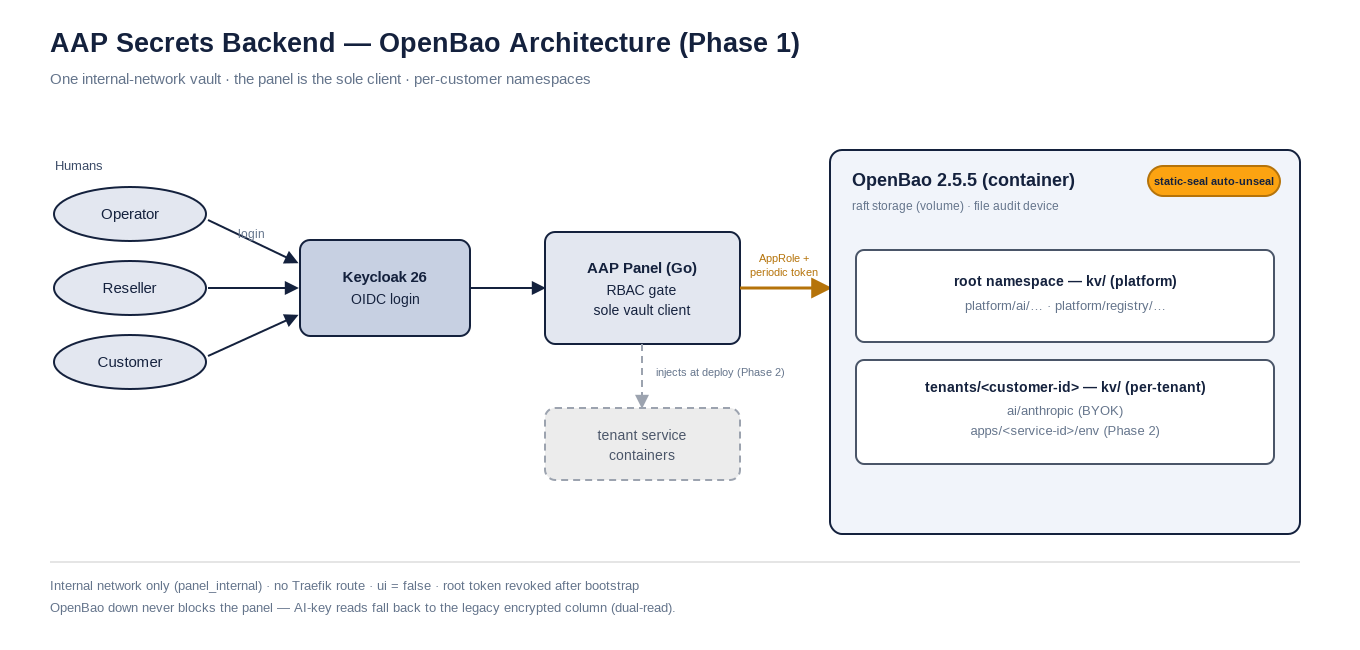
The panel uses OpenBao for vault-backed AI keys, generated service secrets and recoverable customer API/MCP tokens. The panel mediates access through its permissions and customer association. The vault is trusted infrastructure, not a security boundary against a compromised panel or host.
Stored values and legacy mode
With the vault backend available, generated service tokens are materialized into vault entries and references in saved Compose configuration. Existing entries are reused on redeployment; redeploying is not a general-purpose rotation.
Older services, manually entered environment values and legacy AI-key fallback can still use encrypted database columns. A database backup must therefore be treated as sensitive; do not assume it contains no recoverable secret material. AI-key reads can use a legacy encrypted value only when one is available. A vault-only entry cannot be recovered by that fallback during an OpenBao outage.
Customer namespace creation and deletion run as background work. Inspect errors and reconcile failed cleanup rather than assuming it completed with the customer request. Image updates alone do not prove that an older install has the required OpenBao service, configuration and migrations in place.
View and manage secrets
Settings → Security → Secrets shows backend health and migration status. It also says how this server keeps the vault's unseal key: encrypted with the TPM2 and host key, encrypted with the host key only (partial protection: a full-disk copy or provider snapshot can still open the vault), or not encrypted. To encrypt it on an older installation, run sudo aap-openbao-key protect on the server (Backup and Restore). The separate Secrets page is subject to secrets.view and secrets.manage. You pick a customer at the top, then choose one of three tabs:
| Tab | What it shows |
|---|---|
| App passwords & keys | Database passwords, environment variables and keys used by the selected customer's apps. |
| AI provider keys | API keys the selected customer's AI features use, for example their own OpenAI or Anthropic key. |
| Not assigned to a customer | Secrets of apps you run yourself (apps with no customer), and the default AI keys used when a customer has no key of their own. The customer selection does not apply here, so the picker is disabled on this tab. |
Each tab opens with one line that says the same. In the app tab, every secret has a Class tag; hover it to see what it means:
| Class | Meaning |
|---|---|
| Env | A value the app reads from its settings. Rotate saves a new value and restarts the app. |
| Postgres / MySQL | A database password. Rotate changes it in the database first, then restarts the app. |
| Fixed | Created once and never changed, because other values depend on it, for example a signing key. It cannot be rotated. |
| Legacy | Saved by an older version, without a type. It cannot be rotated from this page. |
Service Credentials cards expose the allowed generated values with audited reveal controls. A portal view is scoped to its customer and shows only the first two tabs, with no customer picker and no Not assigned to a customer tab.
The Credentials card on a service's detail page is governed by services.manage on that service, not by secrets.view or secrets.manage. It loads its values when the page opens, and every load that returns at least one value writes one service.credentials.read entry to the audit log before the values are sent. The entry names the service and the credential keys (for example POSTGRES_PASSWORD), never a value. It is a secret reveal, so the secret-reveal rules apply: if the entry cannot be saved the card's values are not sent (503 audit_unavailable), a refused load is recorded without naming the service, and only platform administrators see these entries, which are deleted after one year. Because it records a page visit rather than a change, it never appears in the dashboard's recent-activity feed or count.
When a deploy finishes, the Deploy section of the service's page lists the names of the credentials the deploy generated (for example PASSWORD_ADMIN), never their values, and Show sign-in details opens the Overview tab. The values are read there, in the Service Access card, so each read goes through the permission check and the audit entry above. Apps whose setup section has its own credentials list (for example OpenClaw, Qdrant, RustFS and the developer workspaces) show the values only there, through the same check and audit entry, so each value appears once on the page. Before AI-1315 the completion message carried the values themselves: anyone watching the deploy with services.view_logs received them, and nothing recorded it.
Which customer that is: the customer of the organization the login's permissions come from, which is its oldest organization-wide membership. A login of one customer sees that customer. A login of more than one customer sees secrets for that one only and gets "access denied" for the others. That includes a known limitation: an account that is the primary login of one customer but was a member of another organization earlier sees the older one and is refused its own customer's secrets. Removing the older membership restores it; see Upgrading for the queries that list affected logins. A membership on another customer's organization does not open that customer's secrets, whatever role the user holds elsewhere. The portal's API key, MCP token and AI pages follow the same rule, so the Secrets page and those pages always agree on the customer.
A service's secrets are shown and readable only in the scope that owns the service now: its customer, or the operator's Not assigned to a customer tab for a service with no customer. After a service moves to another customer, the previous owner's Secrets page no longer shows it, even though the vault can still hold old entries for it there. If a move fails part-way, the copy it left in the other customer's vault space can't be listed, revealed or referenced by that customer. A request for a secret of a service you don't own gets the same "not found" answer as one for a service that doesn't exist. Leftover entries are removed too: the move deletes the previous owner's copy right after the owner changes, and a background sweep soft-deletes any copy left in a customer that does not own the service, about ten minutes later and only once no operation on the service is unfinished. A soft-deleted value can still be recovered by a vault administrator (see the OpenBao runbook); the panel never destroys it.
Before a service moves to another customer, the panel checks that every secret it uses will resolve for the new customer: the service's own secrets move with it, but a reference to the customer's AI provider key or to another service's secret must already exist on the destination side. If one is missing the move is refused with the path of the missing secret, and nothing is changed: the service keeps its owner, its containers and its secrets.
Use secret references when another service needs a stored value. The reference is resolved at container creation; changing the vault does not change an already running container's environment.
Secrets in the customer portal
A customer sees the same kind of list under My Secrets in their portal, in two tabs, App passwords & keys and AI provider keys: the passwords and keys their own apps and AI features use, such as a database password. They can reveal a value when they need it, for example to sign in to an app they deployed; every reveal is recorded in the audit log before the value is shown, and a refused attempt is recorded too. Only platform administrators read those entries; see Secret reveals. Customers cannot rotate or restore values there, and they never see another customer's secrets or the operator's Not assigned to a customer tab. See Rotation and recovery for what an operator can do.
Rotation and recovery
Rotate a Service Secret explains the available rotation classes. PostgreSQL and MySQL classes attempt a database password change; environment-only secrets get a vault update and container recreation. Application accounts not managed by that mechanism need their own procedure.
Rotation can fail after a value changes. If the apply step fails, the worker attempts to write the old value back as a new vault version. That rollback can also fail. A recreation failure can leave containers using an older value. Check the failure stage, actual application access and dependent services before retrying. A version restore uses the same process and failure boundaries.
A queued rotation acts only for its owner. A rotation or restore is bound to the customer that owned the service when it was requested. If the service has changed hands before the job runs, the job is cancelled without touching anything, so a request made for one customer can never change another customer's credential. A rotation that waits more than an hour behind an unfinished operation is cancelled too.
How the panel stores secrets
Secrets that live in the panel's own database (AI provider keys, two-factor secrets, the vault's bootstrap login, generated app passwords, git deploy keys, environment variables, webhook secrets and encrypted settings) are encrypted with keys derived from /opt/aiadminpanel/secrets/master_key. That file is never in a backup set; whoever holds it can decrypt every one of these values, so protect it like the server itself.
From AI-1345 on, each kind of secret ("purpose") gets its own key, and each encrypted value is tied to the exact place it was written for: purpose, table, column and row. A value copied into another row, column or kind of secret no longer opens there. Each value also starts with a small header naming the format version and the master key that encrypted it, which makes it possible to replace the master key later without losing data.
| Purpose | What it holds | Where |
|---|---|---|
ai-provider-key | AI provider API keys | ai_provider_configs.api_key_encrypted |
totp-secret | Two-factor (TOTP) secrets of the panel's retired own two-factor; no longer written on installed panels (AI-1438) | users.totp_secret |
totp-backup-codes | Backup codes of the same; no longer written on installed panels (AI-1438) | users.backup_codes |
openbao-bootstrap | The vault's bootstrap login | openbao_bootstrap |
service-source-config | Saved Compose configuration of apps | services.source_config |
service-credentials | Generated app passwords | services.credentials |
service-git-deploy-key | Git deploy keys | services.git_deploy_key |
env-variable | App environment variables | env_variables.value |
webhook-secret | Deploy webhook secrets | webhooks.secret |
setting | Encrypted panel settings | settings.value |
oidc-id-token | Sign-in ID tokens kept for sign-out | identity_sessions.id_token |
service-snapshot | The Compose file and plain environment values of an app's saved versions (snapshots) | service_snapshots.source_config, service_snapshots.env_plain |
Values written by earlier releases use the old format: one shared key and no place label. The panel keeps reading them, converts them kind by kind, and then closes the old format for that kind: from then on an old-format value of that kind is refused, which is what stops a value planted by someone who could write to the database. The release that introduces this does not convert anything yet, so nothing is closed and every existing value keeps working; later releases convert one kind of secret at a time. oidc-id-token and service-snapshot never had old values and are closed from the start.
Which kinds are closed is listed, one per line, in /opt/aiadminpanel/secrets/legacy_closed, a root-only file next to master_key that the panel can read but not write. Nothing in the database or the API can change it. The installer creates it empty, and the host updater creates it before installing a Compose file that needs it. After every healthy update the updater asks the panel which kinds have no old-format value left and closes those, then restarts the panel once. To close one kind earlier, as root:
/opt/aiadminpanel/close-legacy-secret-format.sh setting
It refuses unless the panel reports that kind ready. The panel reads the file only at start. If the file is missing (for example after the panel image was changed by hand on an older Compose file), the panel still starts, but no kind of secret is closed by the file, so old-format values keep opening. It then logs a warning with the fix at start and every hour, and /readyz shows secrets_legacy_closed: missing. To fix it, run /opt/aiadminpanel/aap-update.sh --reapply as root (after install.sh --refresh-updater if the updater is older), or create the file empty (install -m 600 /dev/null /opt/aiadminpanel/secrets/legacy_closed), give the panel the Compose file secret legacy_closed and recreate the panel. A file that exists but cannot be read or parsed does stop the panel, because it may list closed kinds that must not quietly reopen: check that it belongs to root with mode 0600 and holds one kind per line.
Watching the conversion. As root on the host:
docker exec aiadminpanel_panel panel secrets reencrypt --status          # per kind: last pass, values left in the old format
docker exec aiadminpanel_panel panel secrets reencrypt --status --ready  # the kinds that can be closed now
A kind is reported ready only when, counted at that moment, none of its values is left in the old format and its last pass had no failures; the stored "ready" flag is never trusted. Each pass writes one audit entry when it starts and one when it ends (secrets.reencrypt, counts only). A value that does not open (corrupt, or copied from another place) is counted as failed, left untouched, and keeps its kind from being closed: check that row by hand. A pass runs automatically at start and at most once a day for each kind whose conversion is switched on; the release that adds the conversion switches none on, so nothing changes yet. Rolling back past the conversion of a kind. The older image cannot read the new format, so convert the kind back first, with the newer image still running: panel secrets reencrypt --purpose <kind> --to-legacy. Do this as the very last step, immediately before you swap to the older image. If the kind is closed (listed in secrets/legacy_closed), the running panel refuses the old format, so from the moment the values are converted back it can no longer read them: sign-ins, deployments or settings that need those values fail until the older image runs (or until you convert forward again with --purpose <kind>). An automatic pass never converts a kind forward again after --to-legacy; only the operator's command does. Only one pass of a kind runs at a time; a second one is refused with "another conversion pass of this kind of secret is running".
Undoing a close is needed only when old-format values come back into a closed kind, typically after restoring a database dump taken before that kind was converted. The panel then logs "old format rejected" for those rows. As root, remove that kind's line from /opt/aiadminpanel/secrets/legacy_closed, run docker compose up -d --no-deps --force-recreate panel in /opt/aiadminpanel, let the conversion run, and close it again. oidc-id-token and service-snapshot cannot be reopened.
Host access and backups
A user with root or Docker access on the host can inspect resolved container environments and access the panel's recovery material. Vault encryption does not protect against that level of host compromise. Restrict host access and protect backups together with their required encryption/unseal material.
See Backup and Restore for the service-backup limitations. The repository's docs/runbooks/openbao.md contains the operator procedure. Do not stop OpenBao on the assumption that all features will fall back to legacy storage.