API Keys
An API key lets a customer call the panel's API from a script, a CI pipeline, or another program — without logging in through a browser each time. The key travels as a Authorization: Bearer … header and authenticates the request on behalf of the customer's organization.
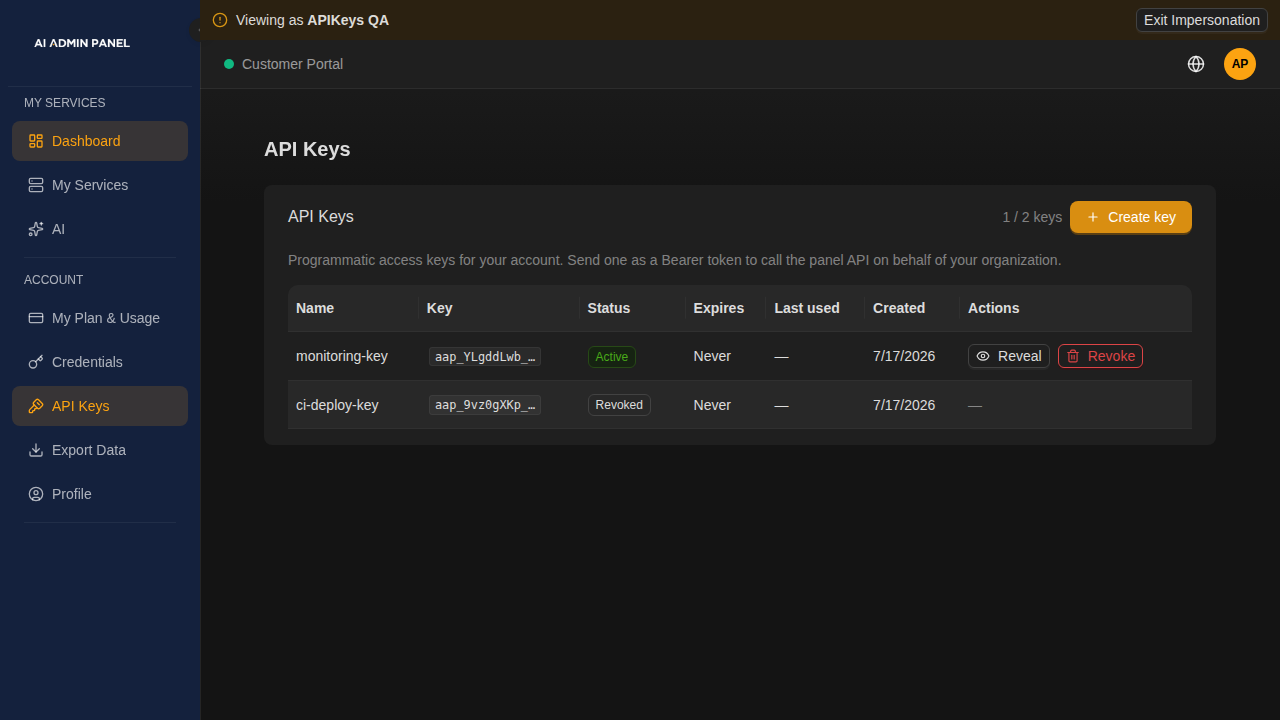
Keys are managed entirely in the UI (Portal → API Keys). There is no terminal step.
What makes a customer key different
The panel supports API keys for operators and org-scoped customer keys with three properties an operator key doesn't have:
- They belong to the customer's organization, not just the user who created them.
- They are stored in the secrets manager (OpenBao), in the customer's own compartment — so the panel can show the full key again later (an audited reveal), not just once at creation.
- They are gated by a capability. An operator turns the
api_keyscapability on or off per plan or per customer. When it's off, the customer can't mint keys and any key they already have stops authenticating immediately — no redeploy, no restart.
Think of it like the key to a rented unit: the building manager (the operator) can revoke access to the whole unit at any moment, and the moment they do, the tenant's key stops opening the door — even though the physical key still exists.
What a key can reach
On the REST API (/api/v1), a key works for the organization it belongs to and the organizations below it, with the permissions of the key's own role there. Keys created in the portal carry the Customer role: services, projects, secrets, usage, and the portal pages. Everything outside the key's organization answers 404, exactly like something that doesn't exist. What the key's creator may do elsewhere adds nothing, and a key is never stronger than its creator is now: it has the permissions of its role that its creator also holds in the key's organization or one above it. If the creator's role there is lowered, the key is cut down with it on the next request. If they are removed, the key loses its role's permissions on the REST API, as it always has, and a current member creates a new one (an MCP token keeps running its tools on the MCP endpoint). A key is never a platform key, and it can create, list and revoke only keys of its own organization. Organization branding is not part of the Customer role, so a portal key cannot change it; use the browser.
One exception, until the next release. Some routes still take the customer from the person who created the key instead of from the key: the Secrets API (/secrets, /secrets/versions, /secrets/reveal) and the portal routes (/portal/…, including the portal key and MCP token lists, reveal and revoke). There a key follows its creator. This only matters when the creator is a login of two customers: a key bound to one of them can then read the other's secrets and list or revoke the other's portal keys, and is refused on its own organization's secrets. Binding these routes to the key is the next step of the same work (AI-1055, slice 2).
On the MCP endpoint, a token reaches only its organization's own services, never the organizations below it. See MCP.
An operator who edits the Customer role changes what every customer key may do, because keys use the role as it is defined at the time of each request.
Who can create a key
A key is issued only to someone who holds, in that organization, every permission of the key's role. Portal keys and MCP tokens carry the Customer role, so:
- A customer login with the default role, the Customer role or the Admin role can create keys.
- A member with a weaker role (for example the read-only User role, or a role on a single project) is told their role doesn't allow it. Give them the Customer role under Organizations → Users, or have another member create the key.
A key is never stronger than its creator is now. On every request the panel checks what the key's creator holds in the key's organization, and the key gets the permissions of its role that the creator still has:
- Lowering the creator's role weakens their keys at once. Change a member from the Customer role to the read-only User role and a key they made loses, for example,
GET /secrets,GET /secrets/versions,POST /secrets/validate-refand reveal. The key is not revoked. It still signs in and answers404on what it lost. It can also no longer create keys or MCP tokens: that answers403with the codeinsufficient_role. - Giving the role back restores the key. Nothing has to be created again.
- Raising the creator's role adds nothing. A key never does more than its own role.
This applies to the permission-checked REST routes only. On the MCP endpoint a token keeps its tools whatever its creator's role, and the /portal/* routes follow the customer's logins, not the creator's role. To cut those, revoke the key.
How fast it takes effect. Changing which role a member has, or removing them, reaches their keys on the next request. Editing what a role contains (adding or removing a permission of the role the creator holds) can take up to 30 minutes to reach the key, because resolved permissions are cached for that long.
Before you lower someone's role, check which integrations run on keys they created, and have a member who keeps the Customer role create a replacement.
Keys that existed before the mint rule shipped were adjusted on upgrade so that none became stronger: a key whose creator held less than the Customer role got the missing permissions added to its deny list. That adjustment is permanent for the key, even if its creator is given the Customer role later. To give such a key the full role, revoke it and have a member with the Customer role create a new one.
Creating and using a key (customer)
Open Portal → API Keys.
Click Create key, give it a name (e.g. "CI deploy"), and optionally pick an expiry (never / 30 / 90 / 365 days).
The full key is shown once, in the format
aap_XXXXXXXX_YYYYYYYYYYYYYYYY. Copy it now — for security it is not shown again automatically.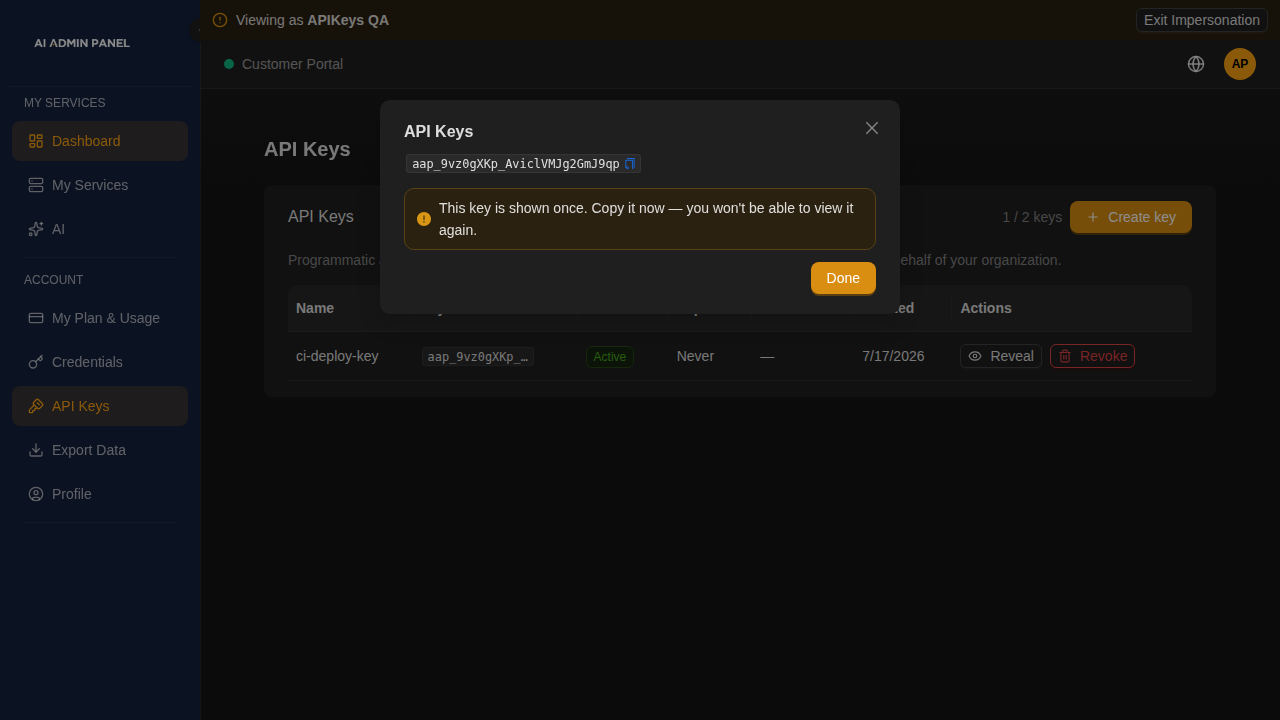
Send it as a bearer token:
curl -H "Authorization: Bearer aap_XXXXXXXX_YYYYYYYYYYYYYYYY" \
  https://your-panel.example.com/api/v1/auth/me
If you lose a key created after org-scoped keys shipped, you can Reveal it again from the same page (this is recorded in the audit log). If you need to retire a key, Revoke it — anything using it stops working immediately. You can always revoke, even if the operator has since turned the capability off.
Why the page might be locked
If your provider hasn't included API keys in your plan, the page shows a locked card explaining why:
- "disabled by your administrator" — the operator turned the capability off globally or suspended the account.
- "not included in your plan" — API keys aren't part of your current plan; ask your provider to enable them.
Any keys you created earlier stay visible so you can still revoke them.
Enabling API keys (operator)
api_keys is a capability, resolved through the same cascade as the other capabilities (see Secrets Manager for the wider secrets story):
- Global switch — Settings → Capabilities. Off beats everything.
- Plan default — a plan may include
api_keysand set an optional max keys limit. - Per-customer override — enable, disable, or set a different max-keys limit for one customer.
The resolution order is: active subscription → global switch (off wins) → per-customer override → plan default → default off. A key minted by a customer authenticates only while the resolved answer is on; flip it off and the key returns 401 on the very next request.
The max keys limit caps how many active (not revoked, not expired) keys an organization may hold. Leave it blank for unlimited.
Upgrading — read this first
The upgrade migration adopts existing customer-role keys into their organization and gates them on the api_keys capability, which defaults to off. That is deliberate (secure-by-default), and it has one consequence you must plan for:
After upgrading, any existing customer API keys stop authenticating until you enable the
api_keyscapability (through the global switch and the relevant plan/customer settings). Operator/admin keys are unaffected — they are never capability-gated.
Enable api_keys where you want those keys to keep working, in Settings → Capabilities and/or on the relevant plan.
Re-reveal is only for keys minted after the feature shipped
Keys created before org-scoped keys shipped were never stored in the vault — only a one-way hash of them is kept — so their plaintext genuinely cannot be recovered. Revealing such a key returns a notice telling you to rotate it instead: revoke it and create a new one. Reveal also depends on the key remaining eligible and its vault entry being available; it is not a recovery mechanism for a missing vault.
What's recorded
Minting, revealing, and revoking a key each write an audit-log entry (api_key.create / api_key.reveal / api_key.revoke) with the key's name and prefix — never the key material itself. The full value is returned at creation and on an authorized Reveal. Treat both responses, copies and clients using the key as sensitive. Vault storage does not protect the value from an administrator with host access.