Tenant MCP
MCP (the Model Context Protocol) is how AI agents and assistants like Claude Desktop, Cursor, and Claude Code talk to external tools. A tenant MCP token lets one of your customers point their own AI agent at their own services — so the agent can list them, check their status, and restart / stop / start them on the customer's behalf, and nothing else.
Tokens are managed entirely in the UI (Portal → MCP Tokens). There is no terminal step.
Two MCP surfaces, hard-split
The panel serves two completely separate MCP servers on the same domain. This is a deliberate security boundary, not a configuration detail:
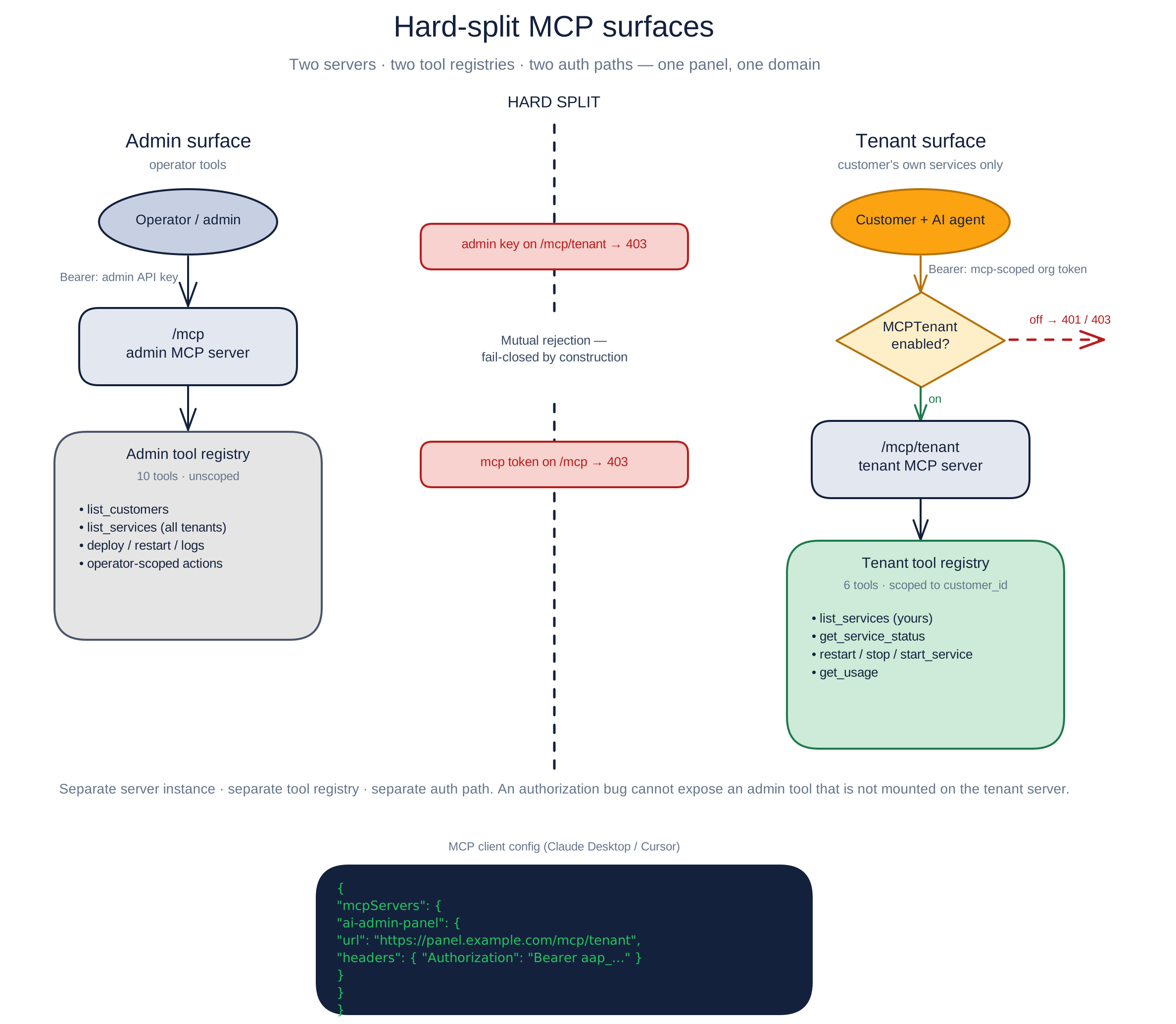
Admin MCP (/mcp) | Tenant MCP (/mcp/tenant) | |
|---|---|---|
| Who | the operator | a customer's AI agent |
| Auth | an admin API key | an mcp-scoped customer token |
| Tools | operator-wide (list customers, all services, deploy…) | customer-scoped tools listed below, plus health |
| Gated by | the mcp.enabled server setting | the MCPTenant capability |
They are separate server instances with separate tool registries. An admin key is rejected on /mcp/tenant; a tenant token is rejected on the admin /mcp. The tenant registry does not mount operator tools. Authentication and customer-scoped lookups are still required for each exposed tenant operation. (The operator-facing admin MCP server is documented separately under MCP Server.)
Creating and using a token (customer)
- Open Portal → MCP Tokens.
- Click Create token, give it a name (e.g. "Claude Desktop"), and optionally pick an expiry (never / 30 / 90 / 365 days).
- The full token is shown once, in the format
aap_XXXXXXXX_YYYYYYYYYYYYYYYY. Copy it now — for security it is not shown again automatically. - Configure your MCP client's Streamable HTTP connection to the endpoint shown on the page:
https://<your-panel>/mcp/tenant. - Supply the token in an
Authorization: Bearer <tenant-token>header. Use a client that supports this authentication method; do not select an unauthenticated connection without also supplying that header.
If you lose a token, you can Reveal it again from the same page (this is recorded in the audit log), or Revoke it — any client using it stops working immediately. You can always revoke, even if the operator has since turned the capability off.
What a token can do
A tenant token is scoped to the customer's account by construction — every tool only ever sees and acts on that customer's own services. The v1 toolset is:
list_services— list the customer's servicesget_service_status— check one service's statusget_logs— read a bounded snapshot of one service's recent container logsrestart_service— restart a servicestop_service/start_service— stop or start a serviceredeploy_service— re-pull the latest images and recreate one service's containersdeploy_template— deploy a catalog template as a new service the customer owns (quota-checked)get_usage— the customer's resource/usage snapshot
Asking about a service the customer doesn't own returns the same "not found" as a service that doesn't exist in the service ownership checks. This is not a guarantee against every possible information leak. A deploy_template always creates the service under the calling customer's account (ownership by construction) and is subject to their per-template quota.
Not in v1: live log streaming (
get_logsreturns a bounded snapshot, not a live tail) is the last deferred tool. Secrets reveal, service delete, billing, and any cross-tenant or operator tool are not in the shipped tenant registry.
Why the page might be locked
If your provider hasn't included MCP in your plan, the page shows a locked card explaining why:
- "disabled by your administrator" — the operator turned the capability off globally or suspended the account.
- "not included in your plan" — MCP isn't part of your current plan; ask your provider to enable it.
Any tokens you created earlier stay visible so you can still revoke them.
Enabling tenant MCP (operator)
MCPTenant is a capability, resolved through the same cascade as the other customer capabilities (see Secrets Manager for the wider story):
- Global switch — Settings → Capabilities. Off beats everything.
- Plan default — a plan may include MCP tenant access (a plain on/off; no limit).
- Per-customer override — enable or disable it for one customer.
The resolution order is: active subscription → global switch (off wins) → per-customer override → plan default → default off. Because the capability is checked at every connection, turning it off invalidates the customer's live tokens on the next request — no redeploy, no restart (off means off now). A denied connection gets a plain 401/403.
MCP is independent of API keys. A customer with MCP on but programmatic API keys off can still mint and use MCP tokens, and vice-versa — the two are separate capabilities gating separate surfaces.
What's recorded
Creating, revealing, and revoking a token each write an audit-log entry (api_key.create / api_key.reveal / api_key.revoke, tagged kind: mcp) with the token's name and prefix — never the token material itself. The full value is returned at creation and authorized Reveal, and is also held by clients configured to use it. Protect those copies as well as the vault. MCP tokens are API keys carrying the mcp scope, so they share the same vault-backed reveal and revoke machinery.
Beyond the token lifecycle, every tool a token invokes is recorded, too. Each successful tool call an agent makes through the tenant surface writes an audit-log entry named mcp.<tool> (for example mcp.restart_service), scoped to the calling customer and — when the call targets one service — tagged with that service's id. Reads (list_services, get_usage, …) are logged alongside actions. Audit records help review successful calls; they are not a complete transcript of the external agent or proof that all downstream work succeeded.